Known Issues and Usage Caveats
Refer to this page for issues specific to using eLxr. If you find an issue yourself not identified by the eLxr Test team, you can report it yourself at https://gitlab.com/elxr. Issues are repository specific, so navigate to the repository where the issue was found, then select Issues > New Issue.
New aria package repositories
A recent synchronization effort has changed the default eLxr Community package repositories listed in the /etc/apt/sources.list file. The single repository listing is now three repositories to match Debian Bookworm and eLxr 26.04 (Bianca) more closely. This is only required for existing eLxr Aria installations. New eLxr Aria installations will have the correct list of sources.
To make sure you have the latest package content available, you must update your /etc/apt/sources.list file. For details, see Package Repository Updates.
Critical CVEs found in aria non-distroless containers
During testing, the eLxr team found the following critical CVEs in all aria non-distroless containers for the libperl5.36 library:
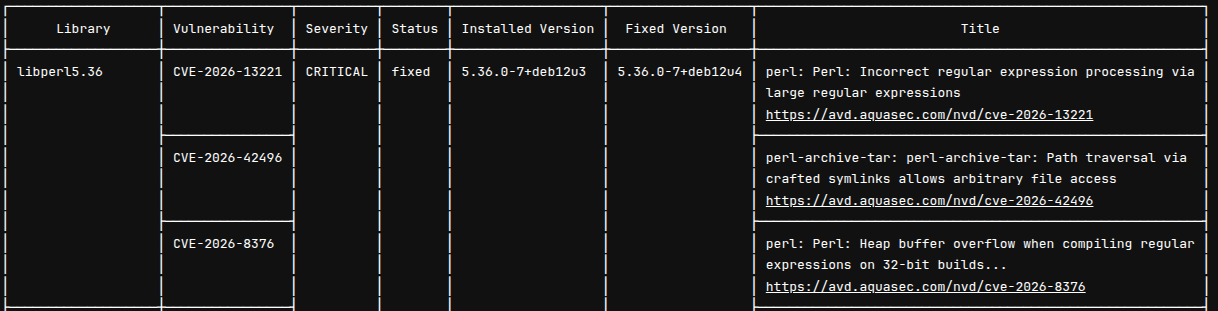
The eLxr team is aware of this issue and will provide a fix as soon as it is available.
The contrib component is required for eLxr 12.10 Server images and earlier releases
When you upgrade to eLxr 12.11.0.0 from a prior release, you must manually add the contrib component to the eLxr mirror entry in /etc/apt/sources.list. This is necessary to ensure package compatibility with eLxr 12.11.0.0 and future releases. It does not support eLxr 12.10.0.0 and earlier releases.
The original entry in /etc/apt/sources.list is as follows:
deb https://mirror.elxr.dev/elxr aria main
Update this entry to match:
deb https://mirror.elxr.dev/elxr aria main contrib non-free-firmware
Hyper-V Support in Microsoft Windows
You may encounter the following error when installing the eLxr 12 Server image using Hyper-V’s Quick Create feature:

To resolve this, you must deselect the option for Secure Boot when you initially create the VM, for example:

Secure Boot requirements
Intel x86 ISO images with OSTree require that the device and eLxr image be set up initially to support Secure Boot. For details, see eLxr 12 Quick Start: Enabling Secure Boot in eLxr 12.
AppArmor audit messages appear during system startup
If you receive the following messages during startup, they are not actual system audit issues, and are instead harmless log information provided by AppArmor. You can safely ignore these messages.
[  118.316386] audit: type=1400 audit(1715915712.608:2): apparmor="STATUS" operation="profile_load" profile="unconfined" name="lsb_release" pid=424 comm="apparmor_parser"
[  118.668268] audit: type=1400 audit(1715915712.960:3): apparmor="STATUS" operation="profile_load" profile="unconfined" name="nvidia_modprobe" pid=426 comm="apparmor_parser"
[  118.669674] audit: type=1400 audit(1715915712.964:4): apparmor="STATUS" operation="profile_load" profile="unconfined" name="nvidia_modprobe//kmod" pid=426 comm="apparmor_parser"
[  119.296759] audit: type=1400 audit(1715915713.592:5): apparmor="STATUS" operation="profile_load" profile="unconfined" name="/usr/lib/NetworkManager/nm-dhcp-client.action" pid=428 comm="apparmor_parser"
[  119.297441] audit: type=1400 audit(1715915713.592:6): apparmor="STATUS" operation="profile_load" profile="unconfined" name="/usr/lib/NetworkManager/nm-dhcp-helper" pid=428 comm="apparmor_parser"
[  119.298098] audit: type=1400 audit(1715915713.592:7): apparmor="STATUS" operation="profile_load" profile="unconfined" name="/usr/lib/connman/scripts/dhclient-script" pid=428 comm="apparmor_parser"
[  119.298988] audit: type=1400 audit(1715915713.592:8): apparmor="STATUS" operation="profile_load" profile="unconfined" name="/{,usr/}sbin/dhclient" pid=428 comm="apparmor_parser"